AchievementSystem 2.0
A modular and flexible achievements system for Unreal Engine. A clean core for managing achievements and categories, without enforcing UI or save logic.
Introduction
AchievementSystem provides a clean core for managing achievements and categories. It does not enforce any UI or save logic, so you stay in full control. All data is loaded from Data Tables, enabling localization and efficient scaling.
How the System Works
The system is built around a simple data flow.
- Define
Achievements and categories are defined in Data Tables and preloaded at runtime. - Save and load
You control how achievements are saved and loaded, then inform the system which achievements are already unlocked. - Use
Once loaded, the system organizes achievements by category and provides structured data you can use directly in UI or gameplay logic.
Getting Started
- Create the child Blueprint
OpenBP_AchievementsSystemand create a Child Blueprint Class. This child will be your main achievements system instance. - Create a structure
Create a Structure that contains your achievement data. It must include anID(Integer) andMax Progress(Integer). - Create a Data Table
Create a Data Table and assign it to your structure. Fill it with your achievement data (names, descriptions, icons, etc.). - Open the Event Graph
OpenBP_Achievements_Childand go to the Event Graph. - Add Preload Achievement Data
Add the functionPreload Achievement Data. It requires three values (see table below). - Connect the values
Connect all required values for each achievement you want to preload.
| INPUT | DESCRIPTIONN |
|---|---|
| ID | The unique identifier of the achievement. |
| Max Progress | The maximum progress value required to complete the achievement. |
| Row Name | The row name of the achievement in the Data Table. |
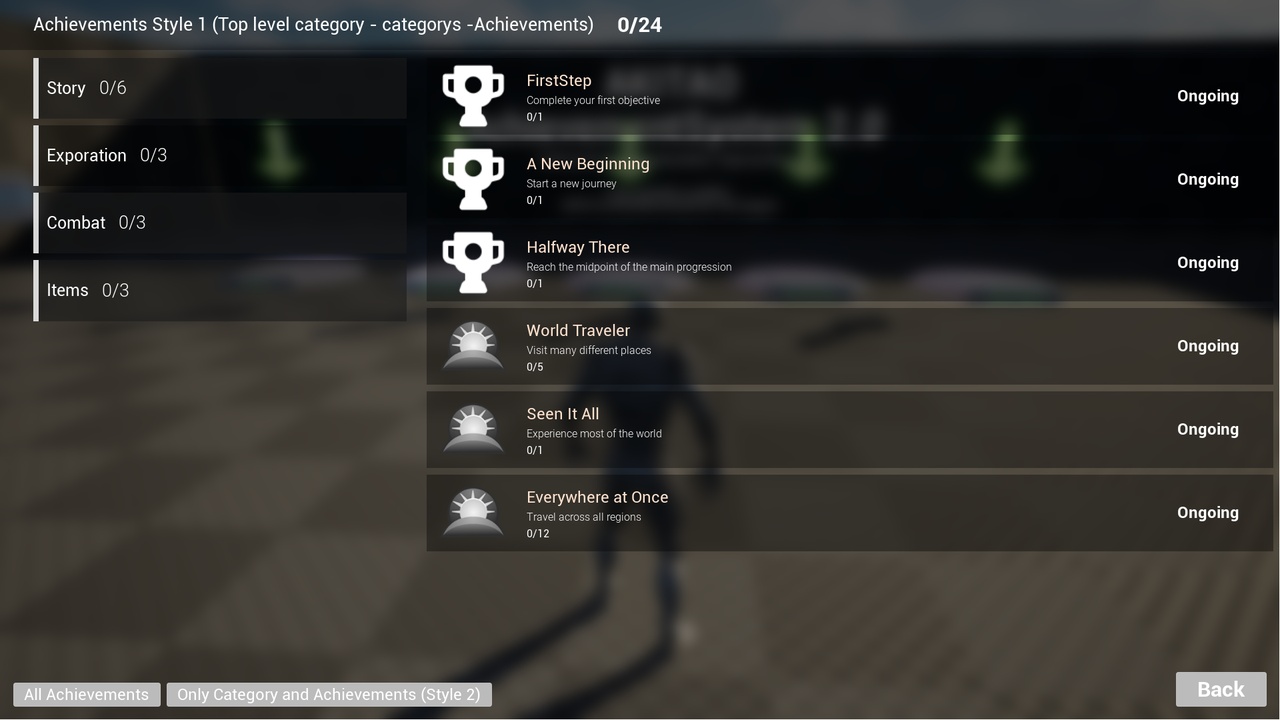
AchievementStyle_01.Categories Overview
The category system is a simple tree with only two levels: Top Level Categories and Achievement Categories. This keeps the system easy to understand and efficient.
Top Level Category 01
├─ Category 01
│   ├─ Achievement .
│   └─ Achievement .
└─ Category 02
    ├─ Achievement .
└─ Achievement .- Top Level Categories contain other categories.
- Categories contain achievements.
- Achievements do not contain anything inside them.
Preloading Achievement Categories
To define which achievements belong to a category, use Preload Achievement Category. It works the same way as preloading achievements.
| INPUT | DESCRIPTION |
|---|---|
| Category ID | A unique identifier for the category. |
| Achievement IDs Array | All achievement IDs that belong to this category. |
| Row Name | The row name of the category in the Category Data Table. |
Preloading Top Level Categories
Top Level Categories group multiple categories together. Use Preload Top Level Category.
| INPUT | DESCRIPTION |
|---|---|
| Category ID | A unique identifier for the top-level category. |
Category IDs Array | All category IDs that belong to this top-level category. |
| Row Name | The row name of the top-level category in the Data Table. |
Simple example
Progress (Top Level Category 01)
├─ Story (Category 01) .
│   ├─ First Step .
│   └─ A New Beginning .
└─ Exploration (Category 02) .
    ├─ First Discovery .
    └─ Master Explorer .

Skills (Top Level Category 02).
├─ General Skills (Category 01) .
│   └─ Perfect Execution .
└─ Precision (Category 02) .
    ├─ One Shot Wonder .
    └─ Steady Hands .
Function Reference
Achievement Trigger).Complete Achievements
The three functions below return the same struct:
- Number of Completed Achievements: total achievements that are completed.
- Max Completed Achievements: the maximum possible achievements.
- Achievements Array: all achievements with their data (ID, progress, completion state, etc.).
| FUNCTION | INPUT | DESCRIPTION |
|---|---|---|
| Get All Completed Achievements | None | Overall progress of all achievements in the system. Use for stats, UI or player feedback. |
| Get All Completed Achievements By Category | Category ID | Progress within a specific category. Use for category progress UI or to check if a category is fully completed. |
| Get Completed Achievements In Top Level Category | Category ID (top-level) | Progress inside a top-level category, including all its sub-categories. Use to show progress for a group of categories. |
Load
Achievement loaders return an array of structs with: Row Name, Complete Date (String), Progress (Int), Max Progress (Int) and Is Completed (Bool).
| FUNCTION | INPUT | OUTPUT / USE |
|---|---|---|
| Load Achievements By Category | Category ID | All achievements in a category. Populate the UI for a single category. |
| Load All Achievements | None | Every achievement at once. Use for overall stats or end-of-game summaries. |
| Load All Categories | None | Array of structs with ID and Row. Populate category lists or run category-level operations. |
| Load Child Categories | Category ID (parent / top-level) | ID and Row of each child category. Show sub-categories inside a top-level category. |
| Load Top Level Categories | None | Array of structs with Row, Category ID and Category IDs (array of children). Show all top-level categories with their sub-categories. |
States
All three are pure functions.
| FUNCTION | INPUT | OUTPUT | USE CASE |
|---|---|---|---|
| Get Progress | Achievement ID (Int) | Progress (Int), Max Progress (Int) | Display or check the progress of a single achievement. |
| Get Row Name | Achievement ID (Int) | Row Name (Name) | Retrieve localized data (name, description, icon) for an achievement. |
| Is Completed ? | Achievement ID (Int) | Return Value (Bool) | Check completion state for gameplay logic or UI updates. |
Achievement Trigger
Triggers and updates the progress of a specific achievement for a given player.
| INPUT | DESCRIPTION |
|---|---|
Achievement ID (Int) | The ID of the achievement to trigger. |
Player Ref (Actor) | Reference to the player who triggered the achievement. |
- Increases or updates the progress of the specified achievement.
- Automatically marks it as completed when max progress is reached.
- Stores the completion state and completion time when finished.
Use case: call it whenever the player performs an action related to an achievement (kill, collect, explore, interact, etc.).
Get Achievement Data
Searches for the default Achievement System instance and returns its reference.
- Input: none
- Output:
Return Value(BP_AchievementSystem reference),Is Valid(Bool).Is Validis false if the system does not exist. - Use case: single-player games, UI, a global achievement system, or when you don't need a specific player reference.
Get Achievement Data By Reference
Returns the Achievement System associated with a specific player, so each player can have their own achievement data.
- Input:
Player Ref(Actor reference) - Output:
Return Value(BP_AchievementSystem reference),Is Valid(Bool) - Use case: multiplayer games, multiple player profiles, player-specific tracking.
Important Architecture Note
All functions in this system except Achievement Trigger are internally built on top of Get Achievement Data. This means they:
- Automatically use the default Achievement System reference.
- Are safe and recommended for UI usage.
- Are designed mainly for UI.
Multiplayer / Online Games Notice
To use a player-specific Achievement System reference:
- Go to
BP_AchievementFunctions. - Find the function you want to use.
- Duplicate it.
- Modify the new function to use
Get Achievement Data By Reference. - Add a
Player Referenceinput to the function.
This gives you full control over player-specific achievement data and multiplayer-safe logic.
Why Achievement Trigger is different
Achievement Trigger does not rely on Get Achievement Data. It requires an Achievement ID and a Player Reference, which makes it safe for gameplay logic, multiplayer-ready, and fully controlled by the developer.
Note for Player-Less Maps
In a level without a Player or Character, the achievement system will not work by default. To fix this, add BP_AchievementsWorld to your level and configure its properties:
| PROPERTY | DESCRIPTION |
|---|---|
| Achievement Class | Select the Achievement Component you want to use (for example BP_AchievementStyle_01). |
| EAchievement Date Format | Date format for completion dates (for example USA, MM/DD/YYYY). |
| Use Category Optimized Loading | Toggle optimized loading by category. |
| Auto Load Category | Toggle automatic category loading. |
This allows the system to function properly in Main Menu, Login, or other player-less maps.
Additional Tools
For Each With Delay (Macro)
Works like a regular For Each Loop, but adds a delay between each iteration.
| PIN | DESCRIPTION |
|---|---|
| Array | The array to loop over. |
Duration (Float) | Time interval between processing each element (default 0.05). |
Loop Body, Array Element, Array Index, Completed | Same behavior as a standard For Each Loop. |
Useful for loading UI elements, achievements, or any array data sequentially without freezing the game.
Get All Data Table Items (Macro)
Retrieves all rows from a Data Table without writing multiple nodes.
| PIN | DESCRIPTION | |
|---|---|---|
Table (input) | The Data Table you want to read. | |
| Loop Body | Runs for each row. Array Element / Out Row is the row struct of the current item. | |
| Row Not Found | Triggered if the row doesn't exist. | |
| Completed | Triggered after all rows are processed. |
Useful for quickly iterating through Data Tables in a clean and efficient way.
AchievementSystem 2.0 · Akitao